I pulled the Mamibot W120-DP apart on paper before trusting a single line of its marketing: 7000Pa, four spray nozzles, ten modes, a $199 price tag, and a 3.2 lb body that spends its working life six floors above concrete. Most of what it claims survives a physics check. Some of it does not, and the failures are the kind you notice only in month three.
Window robots are a strange product category: the ones that work are dull, and the ones that fail fall. Here is how the W120-DP actually behaves, where the spec sheet is honest, and where it is reciting numbers.
Table of Contents
Open Table of Contents
- What the Mamibot W120-DP Actually Is
- Does 7000Pa Suction Hold on a 3.2 lb Body?
- The Four-Nozzle Spray System and the Streak Problem
- Where Edge Detection Stops Being Smart
- The 60 x 40 cm Minimum and Windows That Don’t Qualify
- Tiles, Mirrors and Wood Doors: Surface Reality Check
- Remote, App and Why the Hardware Buttons Matter More
- Noise, Speed and Living With It in an Apartment
- The Consumables Problem Nobody Prices In
- Who Should Buy the W120-DP, and Who Should Walk Away
What the Mamibot W120-DP Actually Is
A suction-driven glass crawler. Two vacuum chambers, a rolling brush or cloth pad underneath, a small water tank feeding four nozzles through two crossed jets, and enough on-board logic to know when it has reached a rubber seal. The body is 2.7 inches thick, which is the number that matters if your window frames are deep and your sills are tight.
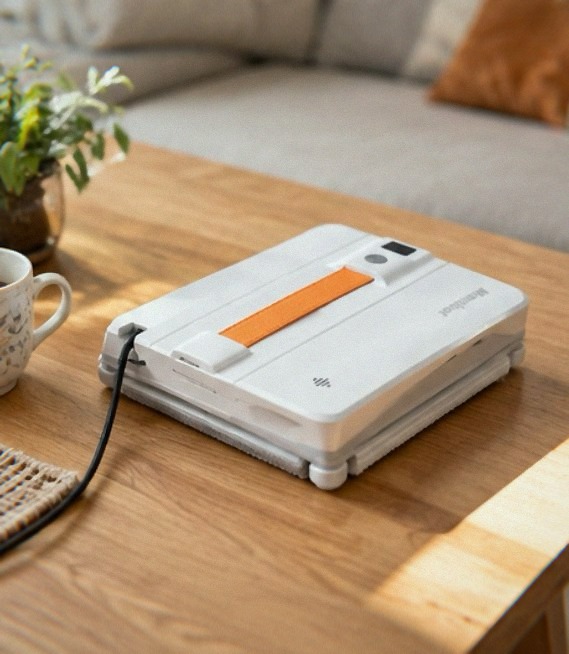 Mamibot sells it at $199.99 in grey, with a remote, a safety rope, a charging adapter and a couple of cloths in the box. It is not trying to be the Ecovacs WINBOT line. It is trying to be the robot you buy when you have eleven windows, a ladder you hate, and no interest in spending four hundred dollars on a machine that cleans glass.
That positioning tells you what to expect: fewer sensors, lighter construction, and a feature list that reads well until you start asking what each feature costs in practice.
Does 7000Pa Suction Hold on a 3.2 lb Body?
The headline number is 7000Pa, and it is real in the sense that the pump can produce that differential at the suction cup under ideal conditions. The useful question is different: how much of it arrives at the glass once the body is loaded.
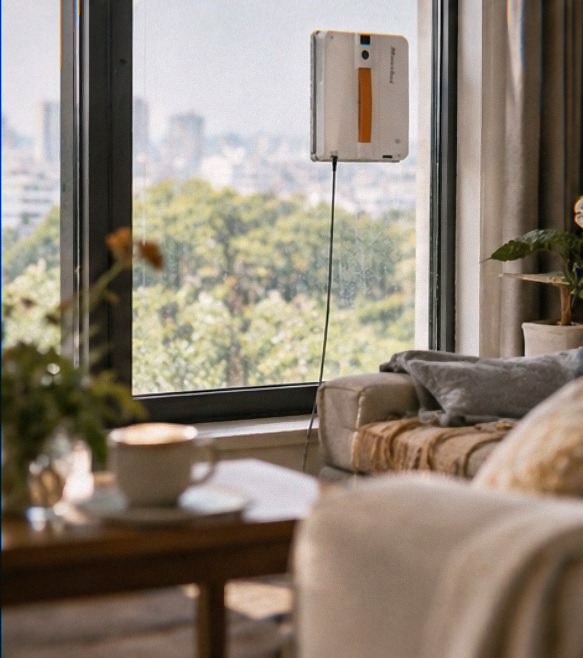
A 3.2 lb body pulls roughly 14 newtons straight down. On a vertical pane, the suction has to overcome that weight plus whatever torque the moving brush generates as it drags across dust. Friction between the rubber tracks and the glass is what actually carries the load; the vacuum exists to press the tracks against the pane hard enough that friction can do its job. Which means the W120-DP is not holding itself up with suction. It is holding itself up with rubber, and suction is the clamp.
That distinction explains the failure mode you should expect over time. The rubber track is a wear part. Every pass over a gritty window eats a little of it. Six months of monthly cleaning on dusty exterior glass, and the track surface glazes and hardens, friction drops, and the robot starts slipping before the vacuum reading changes at all. If you have ever sanded a rubber eraser until it stopped gripping, you already understand what happens to this machine in year two.
It also explains why the weight matters so much. At 3.2 lb, the W120-DP sits in the middle of the category: heavy enough to stay planted against brush friction, light enough that a single pump can clamp it. Lighter robots in this segment skitter and stall on the vertical. Heavier ones demand bigger pumps and thicker bodies, which brings back the window-frame clearance problem.
The Four-Nozzle Spray System and the Streak Problem
Four nozzles, two crossed water jets, ten cleaning modes. This is the W120-DP’s main differentiation against the cheaper two-nozzle machines, and it addresses the single biggest complaint about window robots in general: water dropped in five spots and dragged across the pane by a dry pad leaves five wet tracks.
Crossing the jets helps. Two streams that intersect before they hit the glass break into a finer fan rather than pooling in a line, and finer droplets mean the pad wipes a damp film instead of pushing a bead of water ahead of itself. On an average dirty window, that is enough. The pad picks up the film, the rear squeegee edge pulls it down, and the glass dries almost streak-free.
It is not enough on three specific surfaces:
Hard water and unfiltered tap water
Minerals in tap water stay on the glass after the water evaporates. No nozzle arrangement fixes chemistry. If your area runs above about 200 mg/L hardness, fill the tank with distilled or filtered water or accept a faint mineral haze on south-facing panes. The tank is small enough that distilled water is cheap.
Heavy exterior grime
If you have not washed a set of windows in two years, the contamination is not film, it is a layer: pollen, exhaust, insect residue and calcium bonded into a crust. Four nozzles delivering a fine spray will wet that layer and then smear it. This is a preparatory cleaning problem, not a robot problem. Do one manual pass with a mop and ammonia solution to break the crust, let it dry, then let the robot maintain it.
Windows where the spray stops
Mamibot’s own help material includes a question titled “Why doesn’t W120-DP spray water?” That tells you a fair amount: the spray path clogs, or the tank seal leaks air, or the nozzle orifices film over. With four orifices instead of two, you get better coverage but also twice the number of holes that can partially block. A partially blocked nozzle is worse than a dead one. It dribbles, creates a wet line the pad cannot absorb, and the result looks exactly like a machine that cleans badly.
My position on the spray system: it is the strongest reason to choose this model over a budget two-nozzle unit, and it is also the subsystem you will maintain most often. Rinse the nozzles under warm water after every three or four uses. It takes thirty seconds. Skip it and you will spend a weekend wondering why your robot smears.
Where Edge Detection Stops Being Smart
Edge sensors are infrared emitter-receiver pairs that read the reflectivity drop at the boundary of the glass. On a clean pane with a dark rubber seal, detection is reliable. Move to the situations real windows present and it gets messier.
White frames on white walls. Reflective contrast collapses. The sensor sees a soft transition instead of a hard edge, and the robot either stops early, leaving a four-inch strip along the frame, or pushes into the seal. Almost every window robot behaves this way, including models at twice the price. The difference is the W120-DP has no downward-facing camera fallback and no ultrasonic wall sensing like the more expensive Ecovacs units, so its only input is reflectivity.
Frosted, patterned or curved glass. Mamibot states directly that the machine is not for frosted, curved or rough surfaces. Take that seriously. The vacuum seal cannot form on a curved pane and the edge sensors cannot read a surface that scatters light. A decorative bathroom window with etched glass is a hard no.
 Corner geometry. Window robots physically cannot turn a radius smaller than their own footprint. On a 60 x 40 cm window you will see a two to three inch margin at each corner that the robot never reaches. This is not a software flaw; it is geometry. Budget three minutes with a hand cloth per window for the perimeter, or accept a visible dust ring around every frame.
Combined with a safety rope and the edge logic, the fall risk itself is low. Losing adhesion on a clean, flat pane is uncommon. Losing adhesion on a dusty pane above a heated floor vent is the scenario where the rope earns its place, and it is why you clamp it to something structural rather than looping it around a curtain rail.
The 60 x 40 cm Minimum and Windows That Don’t Qualify
The stated working range starts at 60 x 40 cm. That is not arbitrary. Below that footprint the robot cannot complete enough of a pattern to clean anything, and below roughly 40 cm in one dimension it cannot rotate to change direction, so it gets stuck mid-pass.
Measure before you buy. The windows this machine handles well:
- Standard double-hung panes 70 x 90 cm and up
- Sliding glass doors, including the tall interior versions
- Full-height fixed glazing in modern apartments
- Mirror walls over a metre wide
The windows it fails on:
- Narrow casement panes under 40 cm wide, which is most of what you find in older European and East Coast housing
- Transom windows above doors
- Any individual pane split by muntins into 30 cm squares
Frameless glass also has a specific requirement: at least 3 mm of supporting edge. On a frameless shower panel or a balcony balustrade, if the glass has nothing solid behind its lower edge, the robot’s own clamping force can stress the pane at the unsupported lip. Modern tempered panels handle it; older or thinner glass is a risk you should not take.
Thickness matters too. Anything under 3 mm and the vacuum can deflect the pane itself, which breaks the seal as the robot moves.
Tiles, Mirrors and Wood Doors: Surface Reality Check
Mamibot lists tiles, marble and wooden doors alongside glass. Some of that is legitimate, some is marketing convenience.
Glossy wall tile works if the grout lines are flush or sealed. Recessed grout lines break the vacuum seal periodically; the robot loses a few hundred pascals at each crossing, the pump recovers, and you get a stuttering motion. On a 60 cm tile grid it is tolerable. On small mosaic tile it will crawl and stall.
Marble and polished stone are flat and non-porous, so vacuum and tracks work. The concern is abrasive dust under the pad. Marble is softer than glass, and a robot dragging a pad loaded with grit across a polished surface will leave fine scratches you cannot buff out. Vacuum or wipe the surface first and you are fine. Skip that step on a honed limestone backsplash and you will find out what it costs to repolish.
Wooden doors are the biggest stretch. Painted or lacquered flat doors with no panel relief will hold vacuum on the face, but the pad on a painted surface picks up micro-scratches from the motion, and the robot’s own weight pressing a dusty pad against a lacquered finish is not a combination I would test on a door I care about. On interior doors with raised panels the geometry defeats the suction entirely.
Mirrors are the easiest win in this entire list. Flat, thick, hard glass with a solid frame. A bathroom mirror wall is where this machine looks and behaves its best.
Remote, App and Why the Hardware Buttons Matter More
Two control paths: an infrared remote and the iGLASSBOT app over Bluetooth. Both work. Neither changes what the robot is capable of.
The app gives you mode selection, manual nudging for a specific dirty patch, and scheduling. Scheduling is the least useful feature on the list. You cannot schedule a window robot unattended with a safety rope clamped to a rail and a power cord running to a wall outlet, which means someone has to be present. A scheduled clean at 9 AM on Tuesday still requires you to attach the thing Monday night, and you will not.
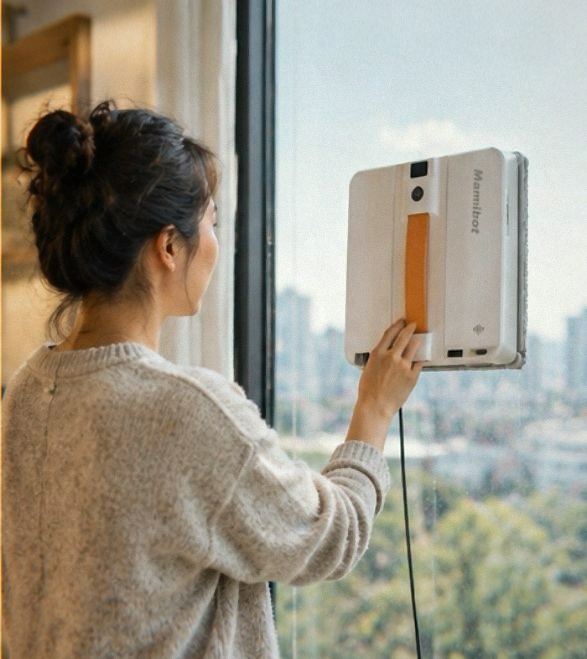
The remote is more practical than it sounds. When the robot leaves a dusty band along the bottom of a window, pulling the remote out and steering it over that band takes a couple of passes. Doing the same in the app takes a lock screen, a connection, and a mode selection.
The controls you will actually live with are the ones on the body: power, pause, and the mode cycle. That is also where one recurring complaint in this category bites. Units occasionally lock into whichever language they were last set to, with no accessible way back through the interface. Before you trust a new unit, confirm the language menu works and note the exact button sequence in the manual. It is a five-minute check that saves you an afternoon.
Noise, Speed and Living With It in an Apartment
A window robot is two noises layered together: a vacuum pump running a continuous high-frequency whine, and rubber tracks peeling and re-seating with a rhythmic slap on every pass.
The W120-DP’s pump is not louder than its competitors — noise in this category sits in a similar band across brands and the practical difference between models is minor. The real problem is duration. A 70 x 90 cm window runs several minutes per pass, and a full pattern typically needs two to three passes to cover the pane. That is fifteen to twenty minutes of pump whine per window, at close range, every time.
In a house, nobody cares. In a studio apartment or an open-plan flat where the windows open onto the same room you work in, it is a hard twenty minutes. Plan to run it while you are out of the room, or buy earplugs.
Speed is the other thing to calibrate. Mamibot’s own FAQ addresses the question directly: the robot walks slower than you would. This is not a defect, it is a consequence of the suction-pause-advance cycle that keeps it attached. If you expect a machine that sweeps a window in ninety seconds, you will be disappointed. If you expect a machine that grinds through a window while you do something else, it delivers.
The Consumables Problem Nobody Prices In
Two cleaning cloths ship in the box. A large dirty window — say a sliding glass door — will saturate one before you finish a pass. Two cloths means you rotate, rinse, wring and continue, which drags a fifteen-minute job to thirty.
Worse: the pad is not a generic microfibre square you can buy at any supermarket. It is cut to fit the pad plate. Which means you are buying from the manufacturer or a compatible third-party seller, and availability in that specific accessory channel is inconsistent. There is an official four-cloth accessory set sold alongside the robot for $19.
Own four cloths minimum, ideally six. Rinse each after use in warm water with a drop of dish soap, dry flat, and do not machine-wash them — the microfibre pile mats and the pad stops transferring dirt from the glass. If you treat cloths as disposables, this machine gets expensive quietly. Properly maintained, a set of six lasts a couple of seasons, which is the same arithmetic as any pad-based cleaning tool.
The tank seal is the second consumable. A leak-resistant tank is leak-resistant, not leak-proof, and a seal that dries out between seasons will start seeping. Store the tank empty with the cap off. Lubricating a rubber seal that has compressed flat is not the kind of maintenance anyone does, so the practical answer is to replace the tank when it starts weeping, not to fight it.
For the broader maintenance rhythm — pad hygiene, track cleaning, and what actually extends these machines past the two-year mark — the window cleaning robot care guide covers the full schedule. The single highest-return habit is the one most owners skip: wiping the rubber tracks with a damp cloth after every session so grit never gets pressed into them.
Who Should Buy the W120-DP, and Who Should Walk Away
The case for it is narrow and specific. You have ten or more windows, most of them large flat panes with solid frames. You have exterior glass you cannot reach from inside, ideally with a balcony or a window you can lean out of to place the robot. You have a $200 budget and no appetite for the $400 to $700 the Ecovacs line asks. You accept a twenty-minute edge cleanup per session as the price of not climbing a ladder.
At $199.99 it competes on price against units with weaker pumps and fewer nozzles. If the suction figure and the spray coverage are the two things you care about most, this is one of the better points in the category — a comparison against the Gnovel 8000Pa robot is worth reading before you commit, because the marketing number and the delivered performance are not the same thing, and that piece breaks down where the extra pascals actually go.
Skip it if any of these are true:
- Your windows are narrow casement panes or heavily divided
- You need the corners of the glass clean without touching them
- You have frosted, curved or textured glazing
- You expect a mirror finish on a window that has not been washed in three years
- You want a robot you can leave running while you are out, unattended
For a wider view of how these machines break down by price and capability, the window cleaning robot buying overview sorts the field by what actually matters on a window rather than on a spec sheet — and if you are weighing a taller, higher-suction design with a different grip strategy, the Hobot S7 Pro breakdown is the honest read on where that approach wins and where it costs you.
The W120-DP is a two-hundred-dollar answer to a specific problem: too many big windows, a ladder you will not use, and a tolerance for wiping the frames by hand afterward. It cleans what it covers, its spray system is the best part of it, and its rubber tracks are the part that will make you replace it in three years. Know that going in and it is a fair machine.